
If you’re here, something already went wrong.
Your book looked fine on screen… then you uploaded it to Amazon KDP or Barnes & Noble Press and suddenly:
- Margins look weird
- Text feels cramped or floating
- Cover doesn’t align
- Page count exploded or shrank
- Or worse… rejected for trim size / bleed issues
Yeah. Happens to everyone.
I’ve fixed this exact mess for thousands of books. First-time authors, publishers, even people who’ve done 20+ titles and still get it wrong.
Here’s the truth nobody tells you:
👉 Book dimensions are not just “size.” They control everything. Layout, readability, cost, spine width, even how “professional” your book feels in hand.
Let’s break this down properly. No fluff. No theory. Just what actually works.
The #1 Mistake Everyone Makes (And Why It Wrecks Everything)
People pick a size like they’re picking a t-shirt.
“6×9 sounds standard.”
“5×8 feels nice.”
“My Word doc is A4, I’ll just use that.”
That’s how you end up with a book that feels off.
Here’s what’s actually happening:
- The trim size defines the final cut size after printing
- Your layout (margins, font size, line spacing) is built around that
- Changing it later = everything breaks
Critical rule:
👉 You must lock your trim size BEFORE you format your manuscript. Not after.
I’ve seen people redo entire 300-page books because they ignored this.
What “Book Dimensions” Actually Mean (No Confusion Version)
Let’s kill the jargon.
Trim Size (the real size of your book)
This is the final width × height after printing and cutting.
Example:
- 6″ × 9″ → standard paperback novel
- 5.5″ × 8.5″ → slightly more compact
Bleed (the part that gets cut off)
If your content goes to the edge (like images or colored backgrounds), you need bleed.
Standard bleed:
- 0.125″ (3.2 mm) on each side
Margins (safe area)
The space between text and edge.
Includes:
- Top / bottom margins
- Outer margins
- Gutter (inner margin near spine) ← this is where beginners mess up
The Most Common Book Sizes (And When Each One Actually Works)
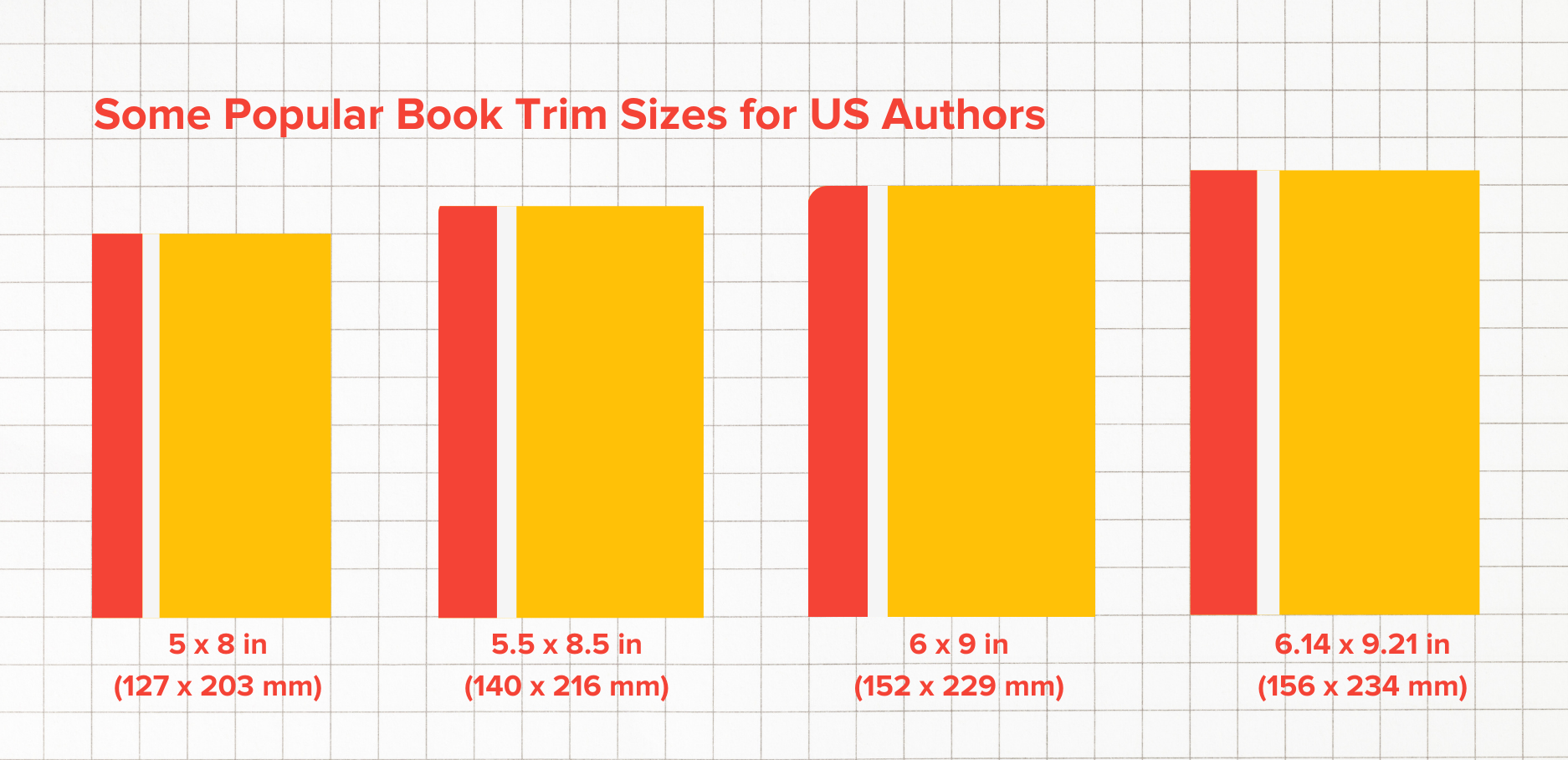
6″ × 9″ — The Safe Default (Most People Should Use This)


This is the industry workhorse.
Used everywhere:
- Fiction novels
- Non-fiction
- Self-help
- Business books
Why it works:
- Comfortable reading width
- Efficient page count
- Cheap printing cost
- Looks “legit” on shelves
👉 If you’re confused, pick 6×9 and move on.
Real example:
A 70,000-word novel:
- 6×9 → ~280–320 pages
- Same book in 5×8 → 380+ pages (higher cost)
5″ × 8″ or 5.5″ × 8.5″ — The “Premium Feel” Size
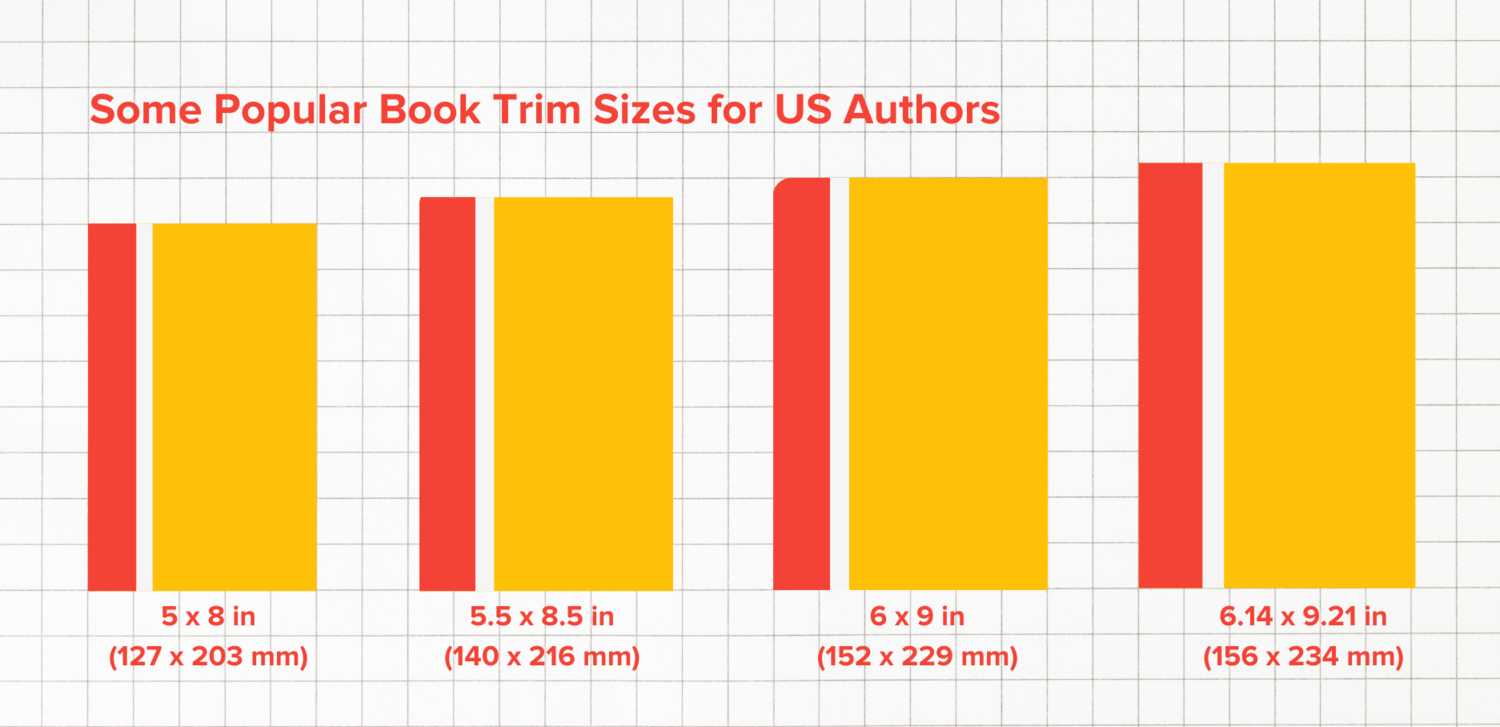

Feels more like traditional trade fiction.
Used for:
- Literary fiction
- Memoirs
- Boutique publishing
Trade-offs:
- More pages → higher print cost
- Tighter layout → needs careful typography
👉 Use this only if you care about aesthetic over cost.
8.5″ × 11″ — The “Document Disguised as a Book”
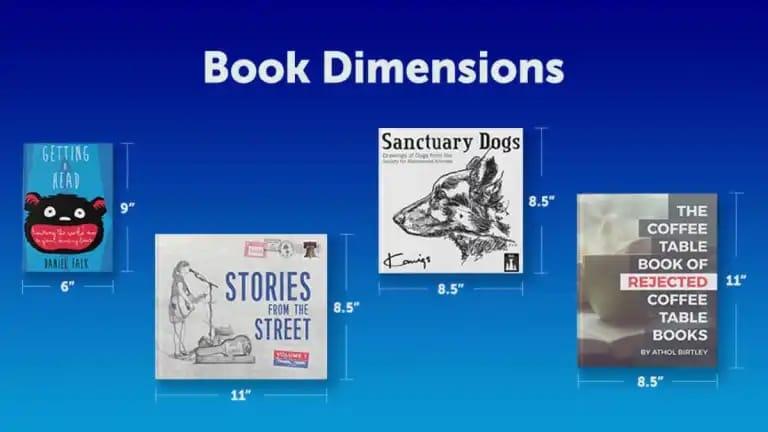

This is basically printer paper size.
Used for:
- Workbooks
- Manuals
- Educational material
- Cookbooks (sometimes)
Problems:
- Feels like a report, not a book
- Expensive to print
- Harder to hold
👉 Never use this for novels. Ever.
7″ × 10″ — The Smart Nonfiction Upgrade
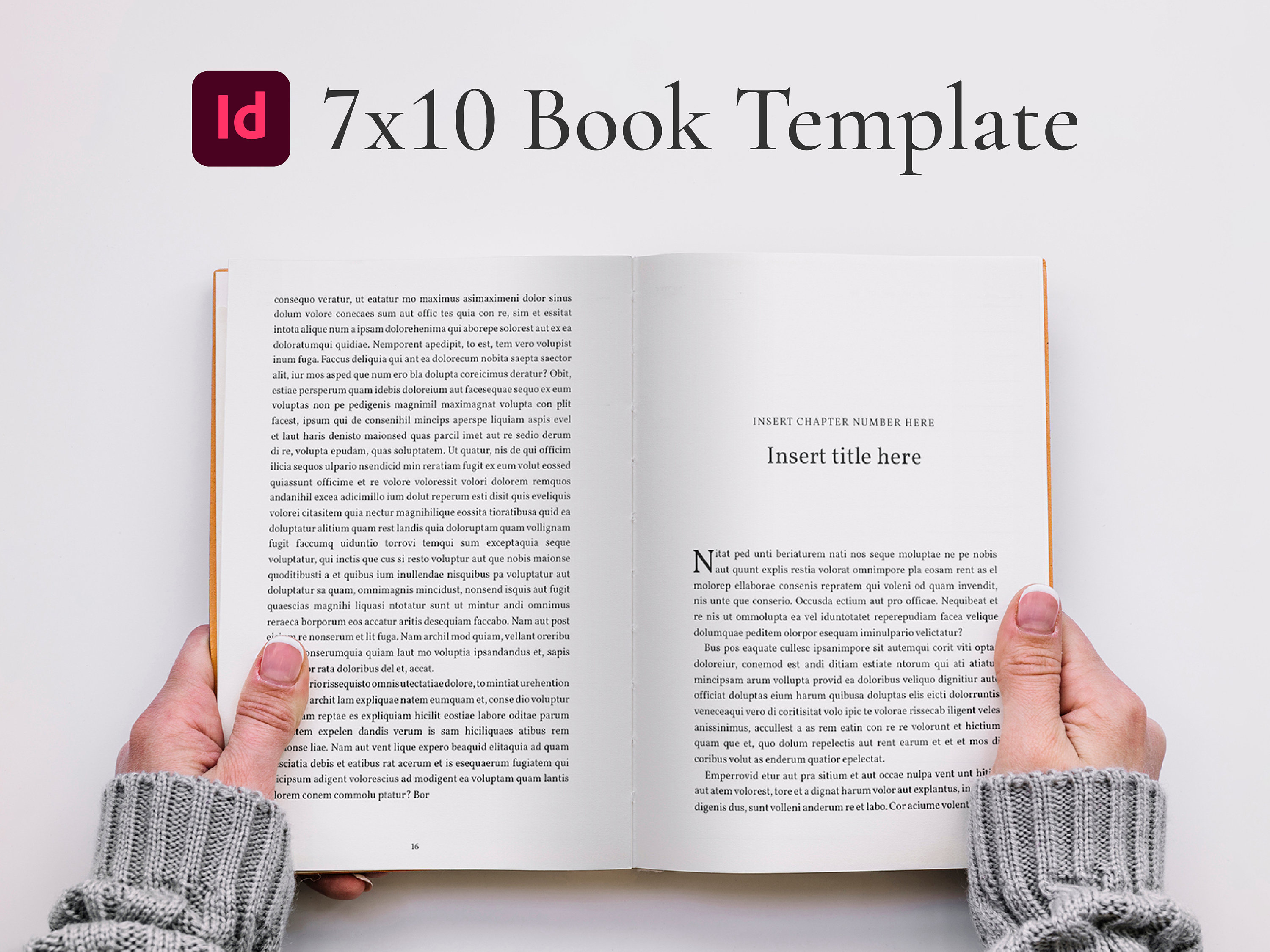
Underrated size.
Perfect for:
- Business books
- Guides
- Illustrated nonfiction
Why it works:
- More space for diagrams
- Fewer pages than 6×9
- Feels more “premium” than small formats
👉 If your book has charts, tables, or visuals — use 7×10.
Quick Comparison Table (So You Don’t Overthink This)
| Trim Size | Best For | Feel | Cost Impact |
|---|---|---|---|
| 6″ × 9″ | Fiction, general nonfiction | Standard | Balanced |
| 5″ × 8″ | Literary, memoir | Premium, compact | Higher |
| 5.5″ × 8.5″ | Trade books | Classic | Medium-high |
| 7″ × 10″ | Nonfiction with visuals | Professional | Efficient |
| 8.5″ × 11″ | Workbooks | Functional | Expensive |
The Gutter Problem (This Is Where Most Books Look Amateur)
Here’s the thing nobody checks until it’s too late.
You open your printed book…
and the text disappears into the spine.
That’s a gutter issue.
What’s happening:
- Pages get glued
- Inner margin gets “eaten”
- Text becomes hard to read
Fix it upfront:
- Under 150 pages → gutter ~0.5″
- 150–300 pages → ~0.6″–0.75″
- 300+ pages → 0.8″ or more
👉 Never trust default margins in Microsoft Word or Google Docs. They are wrong for books.
The Bleed Mistake That Gets Books Rejected
This one’s brutal.
You upload your file…
and the platform says:
“Your file does not meet bleed requirements.”
Here’s why:
If ANY of these touch the edge:
- Images
- Background colors
- Full-page designs
You MUST extend them beyond trim size.
Standard rule:
👉 Add 0.125″ bleed on all sides
So your file becomes:
- 6×9 book → file size = 6.125″ × 9.25″
Miss this? Instant rejection.
Real Case: The 300-Page Disaster I Had to Fix
A client came with:
- A 6×9 book formatted in Word
- No gutter adjustment
- Margins = 0.5″ everywhere
Looked fine digitally.
Printed version?
- Text swallowed near spine
- Outer margins too tight
- Felt like a cheap printout
Fix required:
- Increase gutter to 0.75″
- Adjust outer margins
- Reflow entire document
👉 Took 2 days to fix something that should’ve been set in 5 minutes.
The Hidden Factor Nobody Talks About: Page Count Economics
This one hits your wallet.
Trim size affects:
- Number of pages
- Printing cost
- Royalty (on platforms like Amazon KDP)
Example:
Same manuscript (80,000 words):
| Size | Pages | Print Cost |
|---|---|---|
| 5×8 | ~420 pages | High |
| 6×9 | ~300 pages | Medium |
| 7×10 | ~240 pages | Lower |
👉 Smaller book = more pages = higher cost.
Most beginners ignore this and kill their margins.
Fonts + Size + Dimensions = The Real Equation
Trim size alone doesn’t define layout.
You also need:
- Font type
- Font size
- Line spacing
Typical combo for 6×9:
- Font: Garamond / Times
- Size: 10.5–12 pt
- Line spacing: 1.15–1.3
Change trim size → all of this shifts.
👉 That’s why resizing later breaks everything.
When You Should Break The “Standard Size” Rules
Sometimes standard is wrong.
Use custom thinking when:
- Children’s books → larger, square formats
- Photography books → landscape orientation
- Poetry → smaller trim sizes (intentional whitespace)
- Workbooks → larger pages for writing
But here’s the catch:
👉 Custom sizes reduce distribution compatibility.
Platforms like Amazon KDP only support specific trim sizes.
The “Looks Professional” Test (What Readers Actually Feel)
People don’t consciously think about trim size.
But they feel it.
Bad dimensions feel:
- Cheap
- DIY
- Hard to read
Good dimensions feel:
- Balanced
- Easy on the eyes
- “Real book” quality
That feeling?
It comes from:
- Proper margins
- Correct trim size
- Consistent layout
Quick Decision Framework (Use This and Move On)
If you’re stuck, do this:
- Writing fiction? → 6×9
- Writing a guide/business book? → 6×9 or 7×10
- Want premium feel? → 5.5×8.5
- Making workbook? → 8.5×11
Lock it. Don’t revisit.
Still Getting Errors? Check These Immediately
- Wrong trim size selected in upload dashboard
- No bleed but file has edge content
- Margins too small
- Gutter missing
- PDF export scaling issues
The One Thing I Wish Every Author Knew From Day One
Stop thinking of your book as a Word document.
Start thinking of it as a physical object.
Paper has thickness.
Glue eats space.
Hands hold pages.
Eyes scan lines.
👉 Dimensions are not technical settings. They are physical design decisions.
Once you get that, everything clicks.
You fix this once, properly, and suddenly:
- Your book looks professional
- Uploads get approved instantly
- Readers don’t struggle
- Reviews improve (yes, layout affects reviews)
That’s the difference between a book that exists… and one that actually feels right.