
Yeah… this one frustrates people more than it should.
On paper, Barnes & Noble Press looks simple. Upload book. Set price. Done.
Reality?
Half the people I’ve helped hit the same wall within 48 hours.
Not because they’re careless. Because the platform doesn’t tell you what actually matters.
Let’s fix that.
The #1 Thing Nobody Tells You (And It’s Why Books Get Rejected or Look Terrible)
It’s not your writing.
It’s your file format pretending to be correct when it isn’t.
You upload a DOCX or PDF. It previews fine. You think you’re done.
Then one of these happens:
- Text shifts in the printed version
- Margins look off
- Random blank pages appear
- Fonts change on different devices
- Cover gets rejected for “trim issues”
Why?
Because formatting for Word ≠ formatting for print or EPUB.
Critical fix:
You must build your file for the final format first, not convert it at the end.
Here’s what that actually means in practice:
- Print book → PDF with correct trim size + bleed
- Ebook → clean EPUB, not a converted mess from Word
If you skip that, everything downstream breaks.
“My Book Uploaded But Looks Weird” — The Fast Diagnosis
This is where I start every time. Quick checks.
If your preview looks off, it’s usually one of these:
- Margins too tight → text gets swallowed in the gutter (binding area)
- No mirror margins → left/right pages look uneven
- Manual spacing instead of styles → breaks during conversion
- Images not anchored properly → float to random places
- Fonts not embedded (PDF issue) → replaced silently
Think of your file like a blueprint. If the blueprint is sloppy, the house collapses.
Print vs Ebook — Stop Treating Them Like The Same Thing
Most beginners try to use one file for both.
That’s the mistake.
| Format | What Matters | Common Mistake |
|---|---|---|
| Print (paperback/hardcover) | Margins, bleed, trim size | Using Word defaults |
| Ebook (EPUB) | Flowable text, device compatibility | Locking layout like print |
| PDF (print file) | Fixed layout | Not embedding fonts |
Key idea:
Print is fixed. Ebook is fluid.
If your mindset doesn’t switch here, you’ll fight the platform nonstop.
The Cover Problem (Where Most First-Time Books Die)
I’ve seen solid books fail here more than anywhere else.
Not because of design. Because of dimensions.
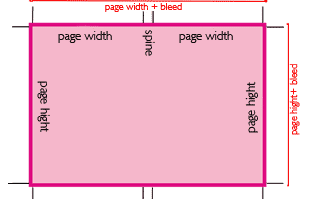
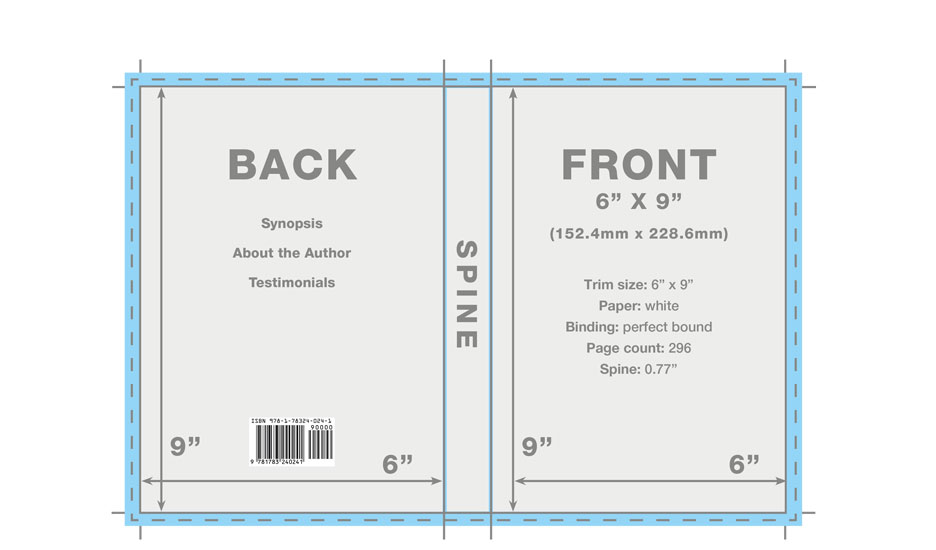
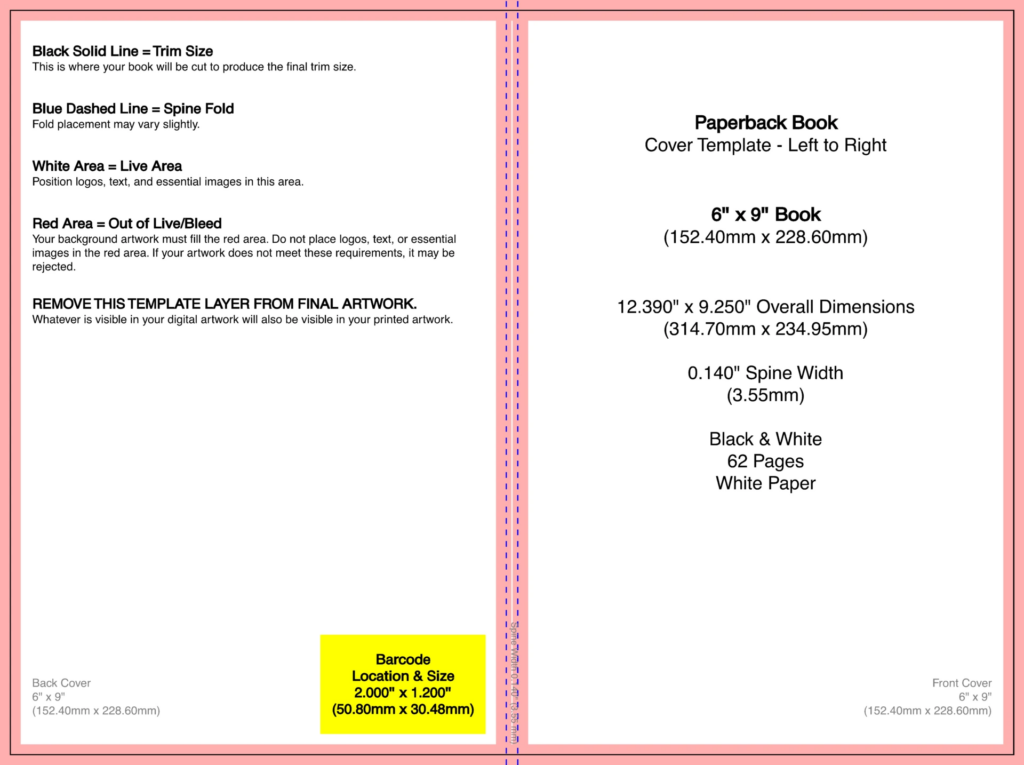
Here’s what people miss:
- Spine width depends on page count + paper type
- You need bleed (usually 0.125 inch / 3mm) on all sides
- Safe zones matter → text too close to edges gets cut
One wrong number → instant rejection.
Fix:
- Use the official cover template generator inside Barnes & Noble Press
- Design directly on top of that template
- Don’t guess spine width. Ever.
Distribution Reality (This Is Where Expectations Break)
Let’s be honest.
Publishing on Barnes & Noble does NOT mean your book lands in physical stores.
People assume:
“I’ll upload → it’ll be in shops.”
No.
What actually happens:
- Your book is listed on Barnes & Noble’s online store
- Print-on-demand fulfills orders
- Physical stores only stock:
- proven sellers
- or books they manually choose
So the real game is visibility, not just publishing.
Pricing Mistakes That Kill Sales (Quietly)
Seen this hundreds of times.
Someone prices like this:
- Ebook: $9.99
- Paperback: $18.99
No sales. They blame the platform.
Problem? Positioning.
Here’s what usually works better:
- Ebook: $2.99 – $5.99 range
- Paperback: competitive with similar books
And watch this:
If your ebook is too expensive, people won’t “test” you.
Unknown author = low trust = lower entry price.
ISBN Confusion (Let’s Clear It Fast)
This one wastes days.
You have two options:
- Use free ISBN from Barnes & Noble Press
- Buy your own ISBN
What changes?
- Free ISBN → Barnes & Noble listed as publisher
- Paid ISBN → You are the publisher
Content doesn’t change. Distribution doesn’t change. Only control and branding do.
The “Why Isn’t My Book Showing Up?” Moment
Happens after publishing. Panic starts.
Here’s the truth:
- It can take 24–72 hours to appear in search
- Metadata takes time to index
- Sometimes cache delays visibility
Check this before worrying:
- Title spelled correctly
- Author name consistent
- ISBN search works
- Book status = “Published,” not “In Review”
If all that checks out… wait. Seriously.
Still Stuck? The Problems That Don’t Show Up Obvious
These are the weird ones I’ve seen over the years:
- Hidden formatting from copied text (especially from Google Docs)
- Extra section breaks causing blank pages
- Images exported at 72 DPI instead of 300 DPI
- Wrong color profile (RGB vs CMYK for print)
- Uploading EPUB generated by bad converters
If things feel “off” but you can’t explain why… it’s usually one of these.
The Simple Workflow That Actually Works (No Drama Version)
If someone asked for the cleanest path, this is what I’d tell them:
- Write in Word or Google Docs (fine)
- Format properly for print OR ebook (separately)
- Export:
- Print → high-quality PDF
- Ebook → clean EPUB (use proper tool, not random converter)
- Use official templates for cover
- Upload to Barnes & Noble Press
- Preview carefully (don’t rush this part)
- Publish → wait → then promote
No hacks. No shortcuts. Just clean execution.
The One Thing I Wish Everyone Knew Before Starting
Publishing is the easy part.
Formatting and positioning? That’s where people lose weeks.
Once you understand:
- Print vs ebook behave differently
- Templates are non-negotiable
- Files must be built correctly from the start
Everything suddenly feels… predictable.
And that’s the goal.
Not guessing. Not hoping. Just knowing what’s going to happen before you click “Publish.”